
Download GitHub Copilot – AI‑Powered Coding Assistant for Developers
Overview
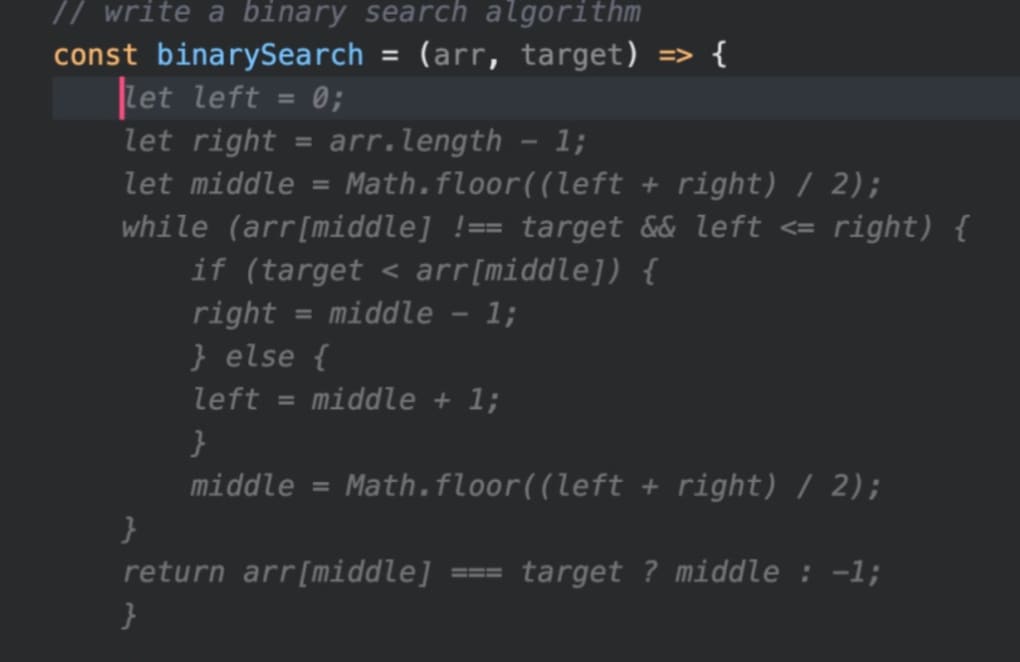
GitHub Copilot is an AI‑inspired software development companion that lives as a browser extension and integrates tightly with Visual Studio Code, JetBrains IDEs, and the GitHub desktop client. Built on OpenAI’s Codex model, Copilot transforms natural‑language prompts into accurate code snippets, function bodies, and even entire modules in a fraction of the time required by traditional manual coding. Whether you are a seasoned engineer looking to accelerate feature delivery or a novice who wants to learn by example, Copilot offers a “coding edge” that reduces repetitive boiler‑plate, flags bugs instantly, and suggests context‑aware completions across dozens of programming languages. The platform is designed for Windows, macOS, and Linux environments, and it works seamlessly with GitHub repositories, making pull‑request reviews and branch management smoother than ever. By leveraging advanced AI, Copilot not only speeds up the development workflow but also promotes best‑practice patterns, helping teams maintain higher code quality while cutting down on manual debugging sessions.
Key Features & Benefits
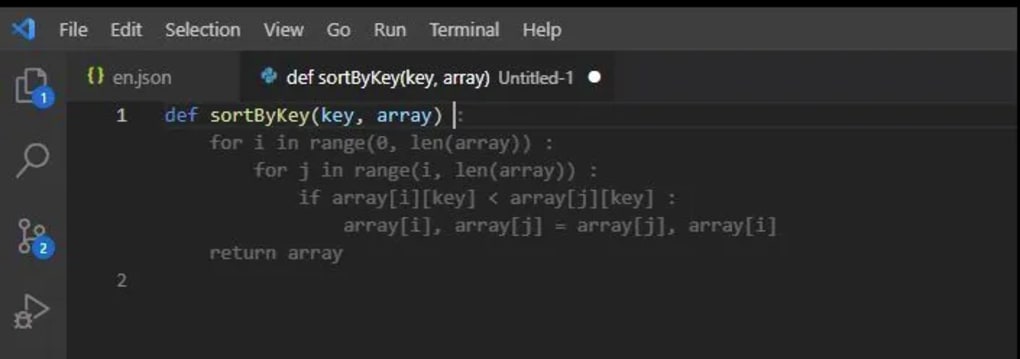
- AI‑driven code suggestions: Generates entire functions, loops, and class structures from plain English descriptions.
- Multi‑language support: Works with over 15 languages including JavaScript, Python, Java, Go, Ruby, and TypeScript.
- One‑click bug fixes: Detects syntax errors, unused variables, and common logical mistakes, offering instant remediation.
- Natural language prompts: Interprets billions of human‑written prompts to produce context‑aware code.
- Seamless GitHub integration: Auto‑populates pull‑request descriptions and suggests changes directly within the GitHub UI.
- Real‑time learning: Adapts to your coding style by analyzing the repository history and personal preferences.
- Secure and private: All code processing occurs on encrypted channels; no proprietary code is stored permanently on OpenAI servers.
These features translate into tangible productivity gains. Developers report up to a 30 % reduction in time spent on boiler‑plate code, while junior programmers benefit from on‑the‑fly mentorship, seeing best‑practice patterns as they type. The one‑click bug‑fix capability also minimizes the dreaded “debugging rabbit hole,” allowing teams to focus on feature innovation rather than endless error hunting. Because Copilot works directly inside the IDE, there is no need to switch between windows or copy‑paste snippets from external sources, keeping the workflow fluid and distraction‑free.
Installation, Usage & Compatibility
Getting started with GitHub Copilot is straightforward. First, ensure you have a compatible IDE such as Visual Studio Code (v1.58+), JetBrains IDEs, or Neovim. Then follow these steps:
- Visit the official GitHub Copilot page and click “Start free trial” or “Subscribe”.
- Sign in with your GitHub account; a subscription can be billed monthly or annually.
- Open your IDE’s extensions marketplace, search for “GitHub Copilot”, and click “Install”.
- After installation, reload the IDE. A pop‑up will ask you to authorize the extension with your GitHub credentials.
- Open any source file, type a comment or natural‑language description (e.g., “// fetch user data from API and sort by name”), and press Tab or Enter to accept the suggestion.
GitHub Copilot supports the major operating systems:
- Windows 10/11 (64‑bit)
- macOS 11 (Big Sur) and later
- Linux distributions with glibc 2.17+ (Ubuntu, Fedora, Debian)
The extension also works with the GitHub mobile app, enabling on‑the‑go code review and quick snippet generation from tablets or smartphones. Regular updates are delivered automatically through the IDE’s marketplace, ensuring you always have the latest AI model improvements and security patches. For teams, an organization‑wide license can be applied via GitHub Enterprise, centralizing billing and compliance management.
Pros, Cons, FAQ & Final Thoughts
Pros & Cons
- Pros:
- Speeds up coding by generating context‑aware snippets instantly.
- Supports a wide range of languages and frameworks.
- Reduces bugs with real‑time error detection and suggestions.
- Integrates natively with GitHub, streamlining pull‑request workflows.
- Continuous learning adapts to individual coding styles.
- Cons:
- Requires an active subscription after the free trial.
- Occasional suggestions may be overly generic or not follow project‑specific conventions.
- Performance depends on internet connectivity; offline usage is limited.
Frequently Asked Questions
Is GitHub Copilot free to use?
Copilot offers a 60‑day free trial. After that, a paid subscription is required (USD $10/month for individuals).
Which IDEs are supported?
Visual Studio Code, JetBrains family (IntelliJ, PyCharm, WebStorm, etc.), Neovim, and the GitHub Codespaces web editor.
Can Copilot write secure code?
Copilot follows best‑practice patterns but does not replace security audits. Always review generated code for compliance with your security standards.
Does Copilot work offline?
Core functionality relies on cloud‑based AI models, so an internet connection is required for most suggestions.
How does Copilot protect my proprietary code?
All data is transmitted over encrypted TLS channels, and OpenAI retains code only temporarily for processing; it is not stored long‑term.
Conclusion & Call to Action
GitHub Copilot has quickly become a must‑have tool for developers who want to stay ahead in an increasingly fast‑paced coding landscape. Its AI‑driven suggestions, one‑click bug fixes, and deep GitHub integration deliver measurable productivity gains while lowering the barrier for newcomers to write clean, functional code. If you’re ready to cut down repetitive typing, accelerate feature delivery, and enjoy a smarter coding assistant, download GitHub Copilot today and start your free trial. Embrace the future of development—let AI handle the boiler‑plate so you can focus on innovation.







